Home < Projects < Accessibility Check AI Assistant

Accessibility Copilot for Healthcare Education
2026
AI
UX
An AI Accessibility Assistant designed to support rapid checks of digital content, providing actionable suggestions and explains why issues matter for accessibility.
Role: Product Designer
Context: Internal healthcare education tools with data control, restricted environment, limited AI license
User: Internal healthcare educators creating training materials
Overview
Accessibility is critical in healthcare, where users have diverse language, cultural, visual, and cognitive needs.
In practice, accessibility is often inconsistently applied across design and development workflows.
Through industry webinars and discussions with healthcare staff, I observed a clear gap: teams understand accessibility is important, but it is not operationalised.
The challenge is balancing speed and accessibility. Teams must move quickly, yet accessibility requires time, expertise, and consistency.
To address this, I designed an AI copilot to support non-experts in identifying accessibility issues early, providing actionable guidance, and building awareness.
Problem
Healthcare teams lack a fast, practical way to perform baseline accessibility checks during design and development.
Team lacked accessibility expertise
Many existing tools could not be used internally (IT/security restrictions)
Manual checking was time-consuming and error-prone
Risk of over-reliance on AI could have consequences for patient-facing content
Mixed technical literacy of users
Opportunity
Design a lightweight AI workflow that:
Works within existing approved ecosystem tools and links (SharePoint, OneDrive, URLs)
Supports multiple content types (images, 2D designs, websites, text)
Provides structured, actionable output
Builds trust and educates users
Works within limited AI licensing and internal security constraints
Suitable for users range from highly technical to non-technical
Design process
#My role
I initiated and designed this as a self-driven project.
Responsibilities:
Translating accessibility guidelines into actionable outputs
Designing a structured AI-assisted review workflow
Prototyping using limited-access enterprise AI tools (Microsoft Copilot)
#Designing Within AI Capability Constraints
Understanding the capabilities and limitations of the available AI tool was critical. I aligned these constraints with the most common content formats used in healthcare design and development workflows.
Due to the limitations of a basic Copilot license, the system supports:
Images
2D design outputs
Simple websites
Text
Links via SharePoint and OneDrive
Tradeoff:
I intentionally limited the scope to ensure reliable and interpretable outputs, rather than overextending into unsupported formats that could reduce accuracy and user trust.
#Key Design Decisions
This workflow helps non-experts engage with accessibility early in the process, without replacing expert audits.
#1 Designing for AI Limitations and Trust
Copilot, Not Autopilot
A key design principle was to avoid over-reliance on AI outputs, especially in a healthcare setting. We chose not to auto-fix accessibility issues because incorrect fixes in healthcare content could introduce risk.
Instead, the copilot:
Provides guidance, not enforcement
Explains why issues matter
Encourages human validation
#2 Structured Output with Risk & Confidence
Risk: Low / Moderate / High / Critical
Accessibility Risk Level indicates how likely an issue is to impact users’ ability to access or understand the content. It helps prioritise fixes, with higher-risk issues representing more significant barriers that should be addressed first.
AI Confidence (Reliability Indicator): High / Medium / Low
Confidence levels indicate how strongly the AI predicts an issue, based on the provided content. They are not a measure of compliance and should always be verified by the user.
#3 Edge Case Handling
Unsupported formats (PDFs/videos) → clear fallback messaging
Multiple inputs → separate scores, recommendations, and confidence for each
Rationale: Ensures the copilot is trustworthy and usable under real-world conditions, while keeping outputs actionable and safe.
#4 Prompt-as-UX Design
The agent is built using modular prompt structures based on Microsoft Copilot capabilities.
Key iterations included:
Reusable prompt templates → reduce cognitive load
Structured formatting → improve readability and consistency
Multi-input handling → support realistic user behavior
Insight:
Prompt design becomes a form of interaction design in constrained AI systems.
#5 Educational Layer
Outputs explain why an issue matters
Includes actionable improvements
Provides learning resources (NHS/UK Gov/WCAG)
#6 guided Task Entry Points
Instead of a blank interface, I designed structured starting points:
Review my image
Review my website
Review my Text readability & clarity
Review 2D design content
What is Accessibility
Accessibility Resource
Rationale:
Helps users understand what the tool can do
Reduces cognitive load for non-experts
Aligns with common healthcare content workflows
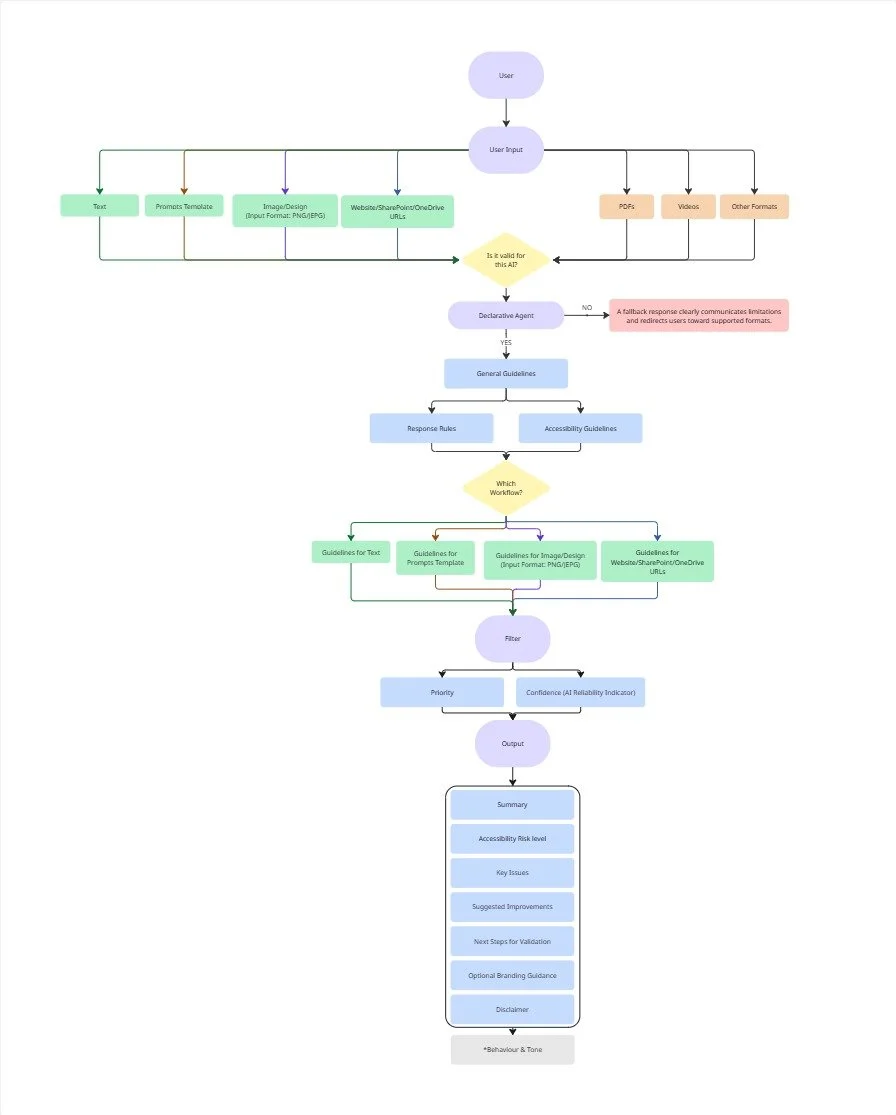
#Prompt Structure Design
Based on Microsoft official document, I built the declarative agent from scratch using those modular in the Instructions section.
*Full integration would increase efficiency, but licensing restrictions and IT policies prevented automatic access.
Rationale:
Accessibility tools often overwhelm users. This design focuses on progress over perfection, enabling early-stage adoption.
Edge Case & Risk Management
Scenario: Users provide unsupported formats (e.g., PDFs, videos)
Design Response:
A fallback response clearly communicates limitations and redirects users toward supported formats.
Why this matters:
Instead of failing silently, the system preserves user trust and clarity of expectation.
#1 Edge case: Unsupported Inputs
Edge Case One
Scenario: Users upload multiple images simultaneously
Challenge: AI responses may blur attribution between inputs
Design Solution: Structured output with clearly separated:
Scores per input
Recommendations per input
Current status: still refining, but ensures results are actionable and understandable, which can improves traceability and usability of results
#2 Edge case: Multiple Inputs & Output Attribution
Edge Case Two
#3 Failure Mode Consideration: Ambiguity & AI Confidence
AI-generated feedback may be incomplete or context-dependent.
Design Approach:
Include disclaimers to clarify scope
Frame outputs as recommendations, not definitive judgments
Encourage expert review for compliance validation
Rationale:
In healthcare, misplaced trust in AI can have real consequences, making transparency critical.
Outcome
Reduced cognitive load and time for early accessibility review
Increased consistency across content types
Improved awareness of accessibility principles among non-expert users
System prioritises safety, trust, and human oversight
It is currently being tested and used in the design and development process of in-house healthcare education.
Reflection
Designing under constraints (limited AI, internal-only use) highlighted the importance of prompt design as UX
Risk-awareness and trust-building are critical in healthcare AI products
Early-stage tools can educate while still being actionable and safe